NBN-ready data points are fixed Ethernet wall sockets that run back to your NBN connection and modem router. They take the single NBN feed and turn it into stable wired outlets for your home office and other rooms. For anyone on the Sunshine Coast who relies on video calls, cloud apps or a home-based business, at least one NBN-ready data point in the home office is close to essential, while very light users in small units may get by with Wi‑Fi alone.
Remote work, side businesses and online study in areas like Maroochydore, Buderim and Caloundra now lean heavily on home internet. When the Wi‑Fi drops out mid Zoom call or a big file upload stalls, stress goes up and productivity goes down. Over time, that constant uncertainty wears people out and chips away at concentration and confidence.
This article breaks down what NBN-ready data points actually are, how professional data cabling in a Sunshine Coast home works, when Wi‑Fi is fine and when wiring is smarter, what it costs, and how Sunshine Coast Projects & Electrical designs it properly the first time. The goal is a calm, reliable home office and connected home that keeps up with work, school, streaming and future tech.
According to NBN Co, more than eight million Australian premises now connect through the NBN, so the in‑home wiring you choose has never mattered more.
Key Takeaways
- NBN-ready data points are hardwired Ethernet sockets that run back to your NBN box and router, not Wi‑Fi boosters or extra services. They let your devices plug straight into the heart of your home network and give your home office the same speed and stability your modem sees.
- Wi‑Fi suits phones, tablets and light browsing, but wired home office data points are far better for video calls, large uploads, gaming and security systems. Cables cut through walls, interference and neighbour networks that slow Wi‑Fi. Less buffering and lag means calmer days and fewer arguments over “who’s hogging the internet”.
- Planning professional data cabling on the Sunshine Coast during a build or renovation keeps costs down and avoids ugly retrofits later. A licensed team like Sunshine Coast Projects & Electrical designs Cat6 cabling, power and NBN connection points as one plan. That gives your home office, EV charger, solar system, smart home gear and streaming setup room to grow.
What Are NBN-Ready Data Points And How Do They Work In Your Home?
NBN-ready data points in a Sunshine Coast home are fixed Ethernet outlets that connect back to your NBN equipment and router through structured cabling. They turn your NBN service into simple, reliable network sockets in the rooms where you actually work and relax.
What Exactly Is An NBN-Ready Data Point?
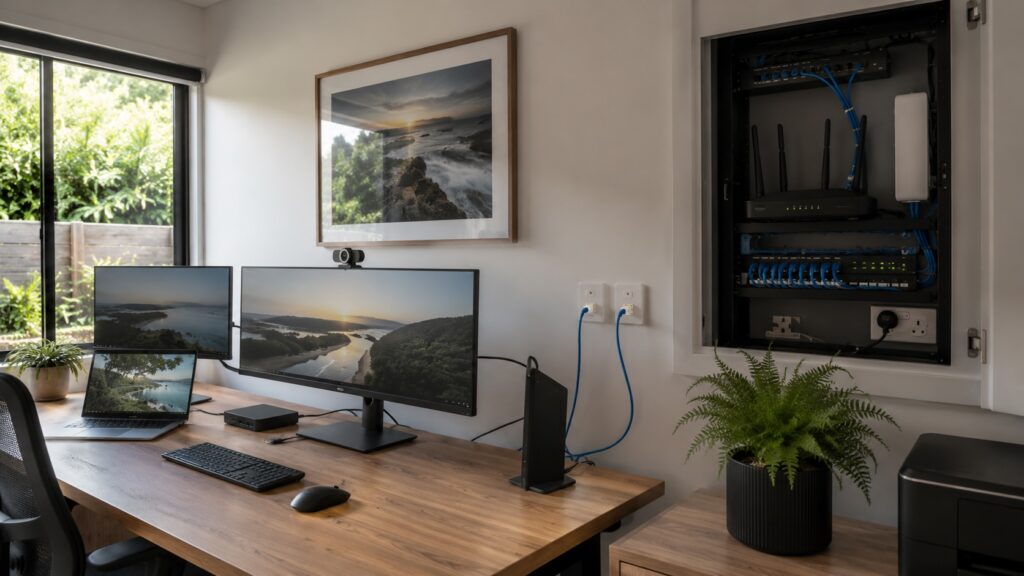
An NBN-ready data point is a run of network cable, usually Cat6, from a central hub near your NBN connection box to a wall plate with an RJ45 socket. At the hub end, the cable lands on another RJ45 socket or a patch panel beside your modem router or switch. When both ends are patched, the outlet becomes a live Ethernet point.
It is not a Wi‑Fi access point by itself, and it is not a USB socket. It does not give you a second NBN service, it simply carries your existing NBN connection around the house. You can plug in:
- Desktop PCs and iMacs
- Docking stations for laptops
- Smart TVs and streaming boxes
- Gaming consoles
- Security NVRs and camera recorders
- POS terminals for home-based businesses
- EV charger gateways
- Solar inverter and battery monitors
Inside the hub, your router from providers like Telstra, Optus or Aussie Broadband connects to the NBN equipment. The router’s LAN ports then link to a small switch and onto each data point. Every live outlet behaves as if your device were plugged straight into the router in the cabinet, even if it is in a study in Bli Bli or a media room in Mooloolaba.
How Do NBN Connections, Routers And Data Points Work Together?
Across the Sunshine Coast, you will mostly see NBN types like Fibre to the Premises, Hybrid Fibre Coaxial and Fibre to the Curb. In each case, NBN Co’s line from the street lands on an NBN device, often called the NTD or NBN connection box. That box has a data port, which links via Ethernet to the WAN port of your modem router.
From that point, your router (from brands like Netgear, TP-Link or ASUS) creates your local network. It:
- Hands out IP addresses
- Runs the firewall
- Delivers Wi‑Fi
- Feeds wired connections through its LAN ports
Those LAN ports feed into a patch panel or small switch, which in turn feeds your NBN-ready data points in rooms like your home office, TV wall or upstairs landing.
A common Sunshine Coast layout is NBN gear in the garage, one or two Cat6 runs to a central study or hallway cupboard, then more runs from there to rooms. Sunshine Coast Projects & Electrical designs the data cabling so the path from the NBN termination to the router is clean, and every data point is correctly labelled and tested.
According to the ACCC, fixed line NBN plans now deliver about 98 percent of their advertised speeds during busy hours, so a solid in‑home network is the key to feeling that performance at your desk.
Why Your Sunshine Coast Home Office Needs Hardwired NBN-Ready Data Points (Not Just Wi‑Fi)
Hardwired NBN-ready data points give a Sunshine Coast home office the full speed and stability of the NBN plan, instead of whatever Wi‑Fi happens to deliver that day. They remove the guesswork and frustration that come with dropouts, lag and patchy coverage.
From a behavioural point of view, people work best when they feel confident their tools will behave. If you are worrying about “will the Wi‑Fi hang on for this client call?”, your brain is split between the task and the risk. A wired link takes that worry away.
How Do Wired Data Points Improve Reliability, Speed And Productivity?
Ethernet links from an NBN-ready data point are not affected by walls, distance inside the home or neighbour networks in the way Wi‑Fi is. For a consultant in Buderim running Microsoft Teams or Zoom, that means:
- Smoother video
- Clearer audio
- Far less chance of freezing mid call
For someone on a VPN back to a Brisbane office, it means steady throughput for cloud apps like Microsoft 365, Xero or Adobe Creative Cloud.
Wi‑Fi inside apartments in Mooloolaba or Maroochydore often fights with other routers, Bluetooth gear and even microwaves. Double brick, foil insulation and concrete floors in modern builds reduce signal strength room to room. A simple Ethernet data point installation to the home office lets that main work PC, laptop dock or VoIP handset bypass all that congestion.
Online gaming in Sippy Downs or Caloundra is another clear example. Latency and packet loss on wireless links can mean rubber banding and lag that ruin the experience. A wired home office internet connection from the router to the console or gaming PC keeps ping times low and stable.
Zoom notes that HD video calls can require up to 3 Mbps up and down for each user (Zoom), so a wired link helps you hit that target consistently instead of fighting the Wi‑Fi.
In day-to-day terms, this means:
- Fewer “Sorry, you froze there, can you repeat that?” moments
- Less mental fatigue from trying to follow broken audio
- More reliable upload speeds for large design files, backups and cloud storage
When Is Wi‑Fi-Only Ok And When Do You Really Need Cabling?
Wi‑Fi only can work well in a small unit or townhouse where the modem router sits centrally and usage is light. If the household mainly:
- Scrolls social media
- Checks email and banking
- Streams a bit of Netflix or YouTube on tablets and phones
…a good mesh Wi‑Fi kit may be enough. In that case, Sunshine Coast Projects & Electrical still often suggests at least one Ethernet run to the best router or mesh node location.
Cabling becomes very important when:
- There is a dedicated home office
- One or more people work remotely most days
- Serious online gaming happens in the house
- High value video calls and webinars are common
- Large uploads (photos, video, design files) are regular
- There are several smart TVs and streaming devices
- You run a home-based business with cloud POS or booking systems
If your income or the kids’ schooling in Nambour depends on clear video calls and solid uploads, that machine should be hardwired. The same goes for security NVRs, smart TVs in the main living area, EV charger controllers and solar gateways that report back to cloud portals from brands like Tesla, Fronius or SolarEdge.
From a psychology angle, people value certainty, convenience and control when they work or study. Nothing creates tension like sitting down for a client call and hoping the Wi‑Fi holds up. A wired office data point removes that hazard for your key devices and leaves Wi‑Fi free for mobiles and tablets.
As Charlie Doblo, Accredited Master Electrician at Sunshine Coast Projects & Electrical, puts it:
“Wi‑Fi is great for wandering around the house, but your main work and media gear deserves a solid cable link. That simple change often feels like lifting a weight off the whole household.” — Charlie Doblo, Accredited Master Electrician, Sunshine Coast Projects & Electrical
How To Design An NBN-Ready Home Office And Connected Home On The Sunshine Coast
Designing an NBN-ready home office and connected home means mapping how you live and work to specific data points and power outlets. Good planning helps new builds, renovations and existing homes in Maroochydore, Bli Bli or Nambour avoid the all too common “NBN box in the garage and terrible Wi‑Fi” problem.
Planning Data Points For New Builds And Renovations
For a new build in places like Sippy Downs or Mooloolaba, the best time to think about structured cabling is when the plans are on the table. Start room by room:
- Mark likely desk walls in the home office
- Note kids’ study nooks and homework areas
- Highlight TV walls in living rooms and media rooms
- Choose ceiling spots for future Wi‑Fi access points
- Consider the garage or driveway area for EV charging and monitoring
A minimum practical layout links:
- The NBN box to a central router position
- The main TV wall
- At least one home office data point
An ideal family layout often includes:
- Two to four Ethernet data points behind the main TV
- Two points near the office desk (for PC/dock and phone/printer)
- One in each bedroom for future desks or smart TVs
- One upstairs or in the hallway ceiling for a dedicated Wi‑Fi access point
- Data points near the switchboard, inverter and battery in Caloundra for smart energy gear
Mark all these points plus the proposed NBN connection point on your building plans. Share that with Sunshine Coast Projects & Electrical so Cat6 cabling, power and any small communications cabinet can be designed together.
Cat6 is a smart standard for residential structured cabling, as it supports gigabit speeds over normal home distances. Good labelling, testing and a simple diagram make later tenant changes or upgrades much less confusing for investors and owner occupiers.
Research on working from home in European countries shows that remote work surged dramatically during and after the COVID-19 pandemic, a pattern reflected in Australia where building with remote work in mind now makes clear sense.
Retrofitting Data Points In Existing Sunshine Coast Homes And Units
Older homes and units across Buderim, Nambour and Caloundra are not stuck with a single modem point and patchy Wi‑Fi. A licensed data cabling installer on the Sunshine Coast can usually add NBN-ready data points with careful routing. Common paths include:
- Ceiling spaces in low set homes
- Under-floor runs in high set Queenslanders
- Neat surface conduit in garages or workshops
Priority retrofit jobs often start with:
- Moving the router closer to the centre of the house and linking it back to the NBN point
- Adding a data point behind the main TV
- Installing a wired outlet in the main home office or studio
Those three changes alone often clean up lag during streaming, gaming and cloud backups.
Some wall types, tight roof spaces or slab-on-ground designs do limit where cables can go, and as research on Bridging the digital divide: connectivity inequalities shows, physical infrastructure constraints are a key reason some households experience persistently worse internet performance than their neighbours even on the same plan. Sunshine Coast Projects & Electrical looks at structure, existing services and safety before proposing routes. Where cable access is just not practical, they may discuss mesh Wi‑Fi or Ethernet over power adapters as backup options, but they treat those as second choice rather than the main plan.
Real-world example: a home-based designer in Maroochydore running large Adobe uploads was losing hours each month to failed transfers over Wi‑Fi. After installing two NBN-ready data points (office and TV wall) and relocating the router, upload failures dropped away and evening streaming stopped clashing with daytime work.
Common Home Office Cabling Mistakes (And How A Licensed Electrician Prevents Them)
Many Sunshine Coast homes suffer from avoidable cabling mistakes that quietly limit NBN performance and flexibility. Understanding these traps helps you spot poor advice and value proper professional work from the start.
What Are The Most Common NBN And Data Cabling Mistakes In Homes?
Common issues include:
- NBN box and modem left in the garage or meter box with no data link to central rooms. The router ends up in the garage as well, where Wi‑Fi struggles to reach bedrooms and living areas. People then buy extenders and still live with black spots, instead of a simple Cat6 run to a better router position.
- Only a single data cable between key areas like the garage and a central study. With one cable, you often must choose between moving the router or keeping other data points active, but not both. Pairs of cables between critical points give far more flexibility for future layout changes and upgrades.
- Confusing a data point with a Wi‑Fi device. Some owners think a data point is a wireless outlet by itself. They never plug in a wired PC or a proper Wi‑Fi access point, so the cabling investment sits idle.
- Unlicensed DIY data cabling. Running your own data cables through walls and ceilings can breach Australian Standards, create safety issues and void insurance.
- Poor labelling at the patch panel. When nothing is labelled, you are left guessing which port links to which room when a fault appears, adding stress and wasted time.
These mistakes don’t just hurt speed. They also add daily friction: people wandering around the house trying to find a “good spot” for calls, kids upset when streaming fails, and constant background worry that the network will misbehave again.
How Sunshine Coast Projects & Electrical Designs It Right The First Time
Sunshine Coast Projects & Electrical starts with either a site inspection or a plan review. They look at:
- The NBN termination point
- Where the best central hub could sit
- How the occupants in suburbs like Maroochydore, Bli Bli or the hinterland actually use the home
From there, they map clear paths from the NBN equipment to a central communications spot, then on to TV walls, home offices, Wi‑Fi access points, EV charger locations and solar inverters.
Power and data are planned together so that NBN boxes, routers, switches and access points have safe, tidy power outlets nearby. All cabling is installed by licensed electricians and registered cablers, and it complies with Australian Standards and Energex requirements. Sunshine Coast Projects & Electrical provides a Certificate of Compliance and backs work with a 12‑month workmanship guarantee.
Charlie Doblo’s two decades of local experience across properties in Buderim, Mooloolaba, Nambour and rural blocks means common problems are spotted before they appear. That experience, plus clear labelling and testing, saves a lot of future frustration.
As Charlie explains:
“Good cabling is almost invisible day to day, but bad cabling shouts at you every time the Wi‑Fi drops. Spending a little time on design upfront is the easiest way to get a calmer, better connected home.” — Charlie Doblo, Accredited Master Electrician, Sunshine Coast Projects & Electrical
What Does Professional Home Office Data Cabling Cost And Is It Worth It?
Professional home network cabling on the Sunshine Coast usually costs less than the time and stress lost to bad Wi‑Fi over a few years. Understanding what affects data point and power point pricing helps you read quotes with confidence.
What Affects The Cost Of Data Points And Power Points For Your Home Office?
Costs depend heavily on whether the work happens during a build or as a retrofit. Running Cat6 with the walls open in a new home in Sippy Downs or Palmview is usually faster than fishing cables through finished plaster in an older Nambour cottage. Roof access, wall types and cable distances all influence labour time.
Other cost factors include:
- Number of points: Installing several data points in one visit spreads labour and usually reduces cost per point.
- Hardware: Patch panels, wall plates, small racks and quality switches add a modest amount on top. Cheaper gear can cause headaches later.
- Additional power outlets: Extra power outlets for office gear, routers and NBN equipment are another line item.
Extra power points for home offices commonly fall in the range of $150 to $300 each, depending on wall type, distance from the switchboard and outlet style, as noted in Sunshine Coast Projects & Electrical’s own quoting experience. They offer transparent, obligation free quotes, so you see the scope and price clearly before any work begins.
Here is a simple comparison of common scenarios.
| Scenario | Typical Complexity | Relative Cost Per Data Point |
|---|---|---|
| New build or major renovation | Walls open, easy access, many points at once | Lowest |
| Retrofit in modern brick home | Roof space access, some wall fishing | Medium |
| Retrofit in hard access areas | Limited roof space, double brick, long runs | Higher |
How NBN-Ready Data Points Deliver Long-Term Value
Even a modest home office data point installation often pays for itself through smoother work days and fewer interruptions. Missed or messy client meetings on Teams or Zoom can cost real money for consultants, freelancers and small business owners working from Buderim or Maroochydore. A stable wired connection cuts that risk sharply.
Multiple Wi‑Fi extenders, low quality routers and endless troubleshooting also add up over time. With proper data cabling, you can:
- Choose better quality networking gear once
- Position it where it performs best
- Leave it alone instead of constantly adjusting
For investors and owner occupiers, a clearly NBN-ready home setup with structured cabling often appeals to tenants or buyers who now expect reliable internet, particularly in family suburbs like Bli Bli and Sippy Downs. Strong connectivity can support higher demand and better rent or resale prospects.
If you plan solar batteries or an EV charger, bundling the data runs with electrical work is efficient. Sunshine Coast Projects & Electrical frequently links EV chargers, battery gateways and switchboard energy monitors into the home network in one coordinated project.
Research into Competition and Quality in broadband markets shows that as NBN competition grows, in-home wiring quality increasingly determines the real-world benefit consumers experience, so having a wired backbone in place makes future upgrades far simpler and avoids redoing work as new services arrive.
Why Choose Sunshine Coast Projects & Electrical For NBN-Ready Data Points And Home Office Cabling?
Choosing Sunshine Coast Projects & Electrical for professional data cabling on the Sunshine Coast means dealing directly with an Accredited Master Electrician who understands both NBN requirements and local homes. The team combines electrical work, structured cabling and smart tech integration in one coordinated service.
Local Expertise, Safety And Future-Proof Solutions
Owner Charlie Doblo brings more than 20 years of hands-on experience across Maroochydore units, high set Queenslanders in Nambour, modern coastal builds in Mooloolaba and townhouses in Bli Bli. That local knowledge helps with decisions like:
- Where to place the NBN hub
- How to route cables through tricky roof spaces
- How salt air near the coast affects components over time
Every data cabling job follows Australian Standards and Energex rules and is completed by licensed electricians and registered cablers. Sunshine Coast Projects & Electrical issues a Certificate of Compliance for the work and backs it with a 12‑month workmanship guarantee. They also hold membership with industry bodies such as Master Electricians Australia, which supports best practice and safety.
Because the business also handles switchboard upgrades, dedicated office power points, EV charging, solar battery systems and smart home integration, you can plan the entire connected home at once. That means your NBN-ready data points fit neatly with lighting, air conditioning controls, camera systems and energy monitoring.
How To Get Started With An NBN-Ready Home Office Setup
Getting started with an NBN home office setup through Sunshine Coast Projects & Electrical is straightforward:
- Initial contact: Call or get in touch online for a fast, obligation free quote. You can share photos, basic floor plans or just explain your current NBN point and Wi‑Fi frustrations.
- On-site assessment or plan review: Charlie and the team map the NBN location, possible router positions, likely device spots and any constraints in your home or small business. They then recommend NBN-ready data points, power outlets and any Wi‑Fi access points that fit your budget and goals.
- Clear written proposal: You receive a written scope covering work, timing and pricing, so you know exactly what will be done and why.
The team works across the wider Sunshine Coast, including Maroochydore, Buderim, Mooloolaba, Caloundra, Sippy Downs, Bli Bli, Nambour and surrounding areas. They focus on friendly communication, tidy work and minimal disruption, so your home office or renovation can keep moving. Reaching out before you line walls or commit to a layout is the easiest way to avoid messy rework later.
Ready To Turn Your Home Internet Into A Proper NBN-Ready Network?
Turning your NBN service into a proper home network with NBN-ready data points gives you a calmer, faster and more predictable day. Hardwired outlets for your office PC, main TV, gaming gear and smart energy systems take the pressure off Wi‑Fi and off your nerves.
Sunshine Coast Projects & Electrical brings local experience, licensed electrical work and structured data cabling together in one team. Whether you are working from a Buderim home office, streaming in a Maroochydore apartment or charging an EV in Caloundra, they can design a layout that makes sense now and leaves space for future tech.
Conclusion
NBN-ready data points are simple pieces of hardware that make a big difference to life on the Sunshine Coast. Instead of hoping the Wi‑Fi will behave, your most important devices plug directly into the NBN-fed network with stable Cat6 cabling. That change supports clear video calls, smoother streaming, stronger security systems and better smart energy monitoring.
Professional data cabling by Sunshine Coast Projects & Electrical adds thoughtful design, safe installation and clear documentation to that picture. For homeowners, remote workers, renovators and investors, it turns an NBN connection into a reliable, long term asset for the property. If your current setup feels fragile or frustrating, an obligation free chat with their team is a practical next step.
Frequently Asked Questions
Question 1: What Is The Difference Between An NBN-Ready Data Point And A Normal Ethernet Socket?
An NBN-ready data point is an Ethernet socket that is wired back correctly to the NBN hub and router. A random Ethernet socket might just run to another room or nowhere useful. Proper termination, testing, labelling and patching to the NBN connection make a data point genuinely NBN ready.
Question 2: How Many Data Points Do I Need For A Home Office On The Sunshine Coast?
Most Sunshine Coast home offices work well with at least two data points near the main desk. One can feed the computer or dock and the other a VoIP phone, printer, secondary monitor hub or extra device. Extra points near the TV wall or a second workspace are handy for future flexibility and for renters or buyers down the track.
Question 3: Can I Use My Existing Phone Or TV Sockets As NBN Data Points?
Old phone sockets and TV coax outlets are different from modern Cat6 data cabling. In many homes they cannot safely or effectively carry Ethernet for NBN-ready data points. A licensed electrician should assess existing wiring and advise whether new cabling is needed for a proper home network design.
Question 4: Do I Still Need Wi‑Fi If I Install NBN-Ready Data Points?
Yes, Wi‑Fi still matters even with good NBN-ready data points. Wired connections suit fixed gear like PCs, TVs, gaming setups and security systems, while Wi‑Fi suits mobiles, tablets and casual browsing. You can also plug Wi‑Fi access points or mesh nodes into data points to give stronger Wi‑Fi coverage around the house.
Question 5: Is It Legal To Install My Own NBN Data Cabling At Home?
No, fixed data cabling that runs through walls or ceilings must be installed by licensed professionals under Australian law. DIY or unlicensed work can create safety risks, interfere with NBN signals and cause insurance problems. Sunshine Coast Projects & Electrical carries out compliant, certified installs for home offices and connected homes.
Question 6: Where Should The NBN Box And Router Be Located In A New Home?
Ideally the NBN box and router sit in a dry, secure, accessible spot with nearby power and good Wi‑Fi potential. Many owners choose a small communications cupboard or central area, rather than a hot garage corner. Planning data and power routes from this spot to key rooms is an important early home network design step.
Question 7: How Long Does It Take To Install NBN-Ready Data Points In An Existing House?
Simple retrofits of one or two data points with easy roof access can be done in a few hours. More complex jobs with several outlets, double brick walls or tricky access will take longer. Sunshine Coast Projects & Electrical confirms likely timing after an inspection and completes tidy clean up at the end so your home office is ready to use straight away.
Question 8: Will NBN-Ready Data Points Improve My Streaming And Gaming Performance?
Yes, hardwired NBN-ready data points almost always improve streaming and gaming performance compared with Wi‑Fi. They reduce latency, packet loss and buffering by giving a clean path from the router to your TV or console. Putting heavy use devices on cables also frees up Wi‑Fi for phones and tablets, which improves the experience for everyone.
Question 9: Should I Install Cat6 Or Something Higher Like Cat6A For My Home?
For most Sunshine Coast homes, Cat6 cabling gives more than enough capacity for NBN speeds and normal distances. Higher categories like Cat6A support longer runs at very high speeds but cost more and need careful installation. Sunshine Coast Projects & Electrical can discuss your future plans (such as 10 Gbps, media servers or advanced smart home integration) and recommend the right cable during quoting.
Question 10: When Is The Best Time To Plan NBN-Ready Cabling For A Renovation Or Extension?
The best time is during the design phase and before walls are lined, so cables run easily and neatly. Reviewing the NBN location, room use, EV charging, solar gear, smart home plans and any home-based business needs together helps create one clean design. Doing data cabling alongside other electrical work usually saves money, mess and a lot of frustration later.